Use case
Keep frontline and shift teams aligned
Chirm helps branch, store, and operational teams share shift-relevant updates, location notices, handover information, and urgent changes in one targeted timeline, even when employees are not desk-based or not all have Microsoft accounts.
Frontline and shift-based teams do not sit in chat all day. Many work on the floor, at the register, or in stockrooms, without a company laptop or individual Microsoft 365 account.
Chirm gives operational communication a calm update layer. Managers publish shift-relevant updates once, target them to the right branch, region, or role, and make them available through whatever access fits the workplace: personal devices, shared tablets, or supervisor-led briefings.
Good fit for
Who benefits
Operations managers, regional managers, store managers, branch managers, plant managers, team leads, internal communications, and HR
Problem: Operational updates are scattered across too many channels
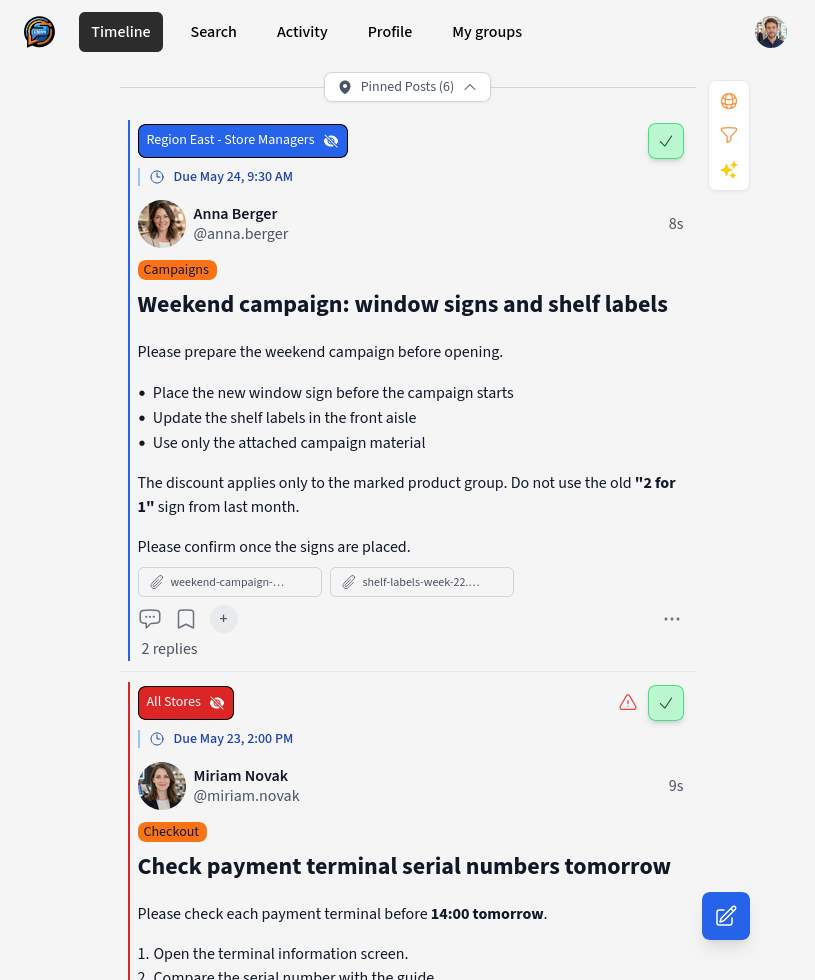
A promotion starts tomorrow and every branch needs the right signage. A payment terminal has to be checked by serial number. A hygiene or labor-law instruction changes. A delivery window moves, a stockroom process changes, or one location has a temporary notice that only matters there.
These updates often travel through branch-manager email, noticeboards, intranet posts, chat, verbal handovers, and supervisor briefings at the same time. In some organizations, only store or branch managers have full email or Microsoft accounts because licensing every floor, shift, part-time, temporary, or seasonal employee would be expensive and hard to administer.
The problem is not a lack of communication. The problem is that there is no reliable last-mile layer for the people who are not naturally living in Teams, Outlook, or the intranet all day. Some employees hear the update twice. Others miss it completely. Leaders often cannot tell the difference between "sent" and "seen."
"Did every branch see this, or did it only reach the manager's inbox?"
If nobody can say for sure, sent is not the same as received.
How this works with Chirm
- 1
HQ, an area manager, a store manager, a team lead, or a responsible department publishes a short operational update in Chirm
- 2
The post is targeted to the affected branch, region, group, location, shift, or role instead of being broadcast to everyone
- 3
Employees see the update in Chirm before, during, or after a shift: on their own phone where allowed, on a company tablet, at a shared station device, or through a supervisor briefing that uses the same source of truth
- 4
Questions and clarifications stay attached to the update as reply threads, so the context is not lost in a separate chat
- 5
Important items can require acknowledgment, giving supervisors a clear view of who has confirmed the update
- 6
Later, employees and leads can find the update again through search instead of relying on memory or old handover notes
What if employees do not have a laptop or phone?
Chirm does not assume that every frontline employee has the same device setup. The right rollout depends on how the workplace already operates. In retail this often means a mixed model: store managers have full accounts, some employees have company tablets or shared devices, and others access updates during briefings.
In some environments, employees can use their own phone or a company phone to check a lightweight web app or PWA. In others, access should happen through a shared tablet, kiosk, break-room terminal, team station, or supervisor device during the shift briefing.
The important distinction is this: Chirm gives the organization one targeted, searchable, confirmable source of truth. The physical access point can be personal, shared, or supervisor-mediated.
This is also why the rollout should clarify the access model early: personal accounts, shared devices, branch-manager assisted access, store tablets, back-office stations, or a mixed setup by location.
Before and after
| Without Chirm | With Chirm | |
|---|---|---|
| Reach | Depends on branch-manager forwarding, noticeboards, emails, chat messages, licensing coverage, and whether a briefing was attended | Relevant branch and shift updates are available from one source of truth across personal, shared, or supervisor-led access points |
| Handover quality | Branch instructions are repeated verbally and can change from manager to manager or shift to shift | Branch context is written once and remains available to the next shift or location |
| Noise | Conversation tools and broad announcements reach people who are not affected | Groups, locations, roles, and topics keep updates targeted and timeline-first |
| Follow-up | Questions are scattered across chat, calls, and supervisor conversations | Replies stay attached to the original update |
| Findability | Past campaign, signage, safety, or IT notices disappear from boards or are buried in messages | Updates stay searchable for branches and employees who have access |
| Account coverage | Often assumes every store employee has the same mailbox, Teams access, or paid collaboration account | Can be piloted with named users, shared branch devices, store-manager assisted access, or supervisor-mediated access |
Who this is relevant for inside the organization
Frontline employees
See the updates that matter for their branch, shift, location, and role without scanning every channel or needing to live in a corporate chat tool all day.
Store and branch managers
Receive clear HQ instructions, campaign updates, signage tasks, operational checks, and HR or safety notices in one place instead of forwarding and re-explaining them manually.
Shift leads
Publish handover notes, temporary changes, and operational reminders once, then answer questions in the same place.
Operations and regional managers
Reduce missed changes across branches, regions, departments, and shifts while keeping communication targeted and calm.
HR and internal communications
Reach non-desk employees with relevant workplace information even when mailbox, intranet, or Microsoft account coverage is uneven.
Safety and quality teams
Send important reminders or process updates to the affected people and request acknowledgment where confirmation matters.
Relevant Chirm features
- Groups: target branches, regions, teams, departments, shifts, sites, and roles with the updates they need
- Topics: categorize updates such as promotions, signage, checkout systems, stockroom work, staffing, safety, logistics, facilities, or quality
- Flexible access: use personal phones where allowed, company tablets, shared stations, or supervisor-led access depending on the workplace
- Timeline-first communication: updates are organized as posts to catch up on, not as endless chat streams
- Required acknowledgment: ask employees to confirm important updates when proof of receipt matters
- Reply threads: keep questions and clarifications connected to the original update
- Search: make past updates findable for employees and supervisors
Example KPIs for a pilot
| KPI | Observation question | What progress looks like |
|---|---|---|
| Acknowledgment rate | What share of targeted employees confirm important operational updates within the agreed timeframe? | High acknowledgment rate for updates marked as important |
| Repeated questions | How often do supervisors answer the same shift or location question repeatedly? | Fewer repeated questions after updates are posted in Chirm |
| Missed operational changes | How often do branches or employees start work without knowing about a relevant campaign, signage, safety, IT, or temporary process change? | Fewer missed branch-level changes reported during the pilot |
| Branch execution | How reliably do stores complete actions such as placing signs, checking equipment, or following campaign instructions on time? | More consistent branch execution with fewer manual follow-up calls |
| Handover catch-up | How long does it take a returning employee or next shift to understand recent updates? | Faster catch-up using the timeline, replies, and search |
| Access coverage | Which employee groups can realistically access Chirm directly, through a shared device, or through a supervisor-mediated process? | Clear access model for the pilot site before scaling to additional shifts or locations |
4-week rollout plan
- 1
Week 1: Choose a region, branch cluster, site, or shift pattern for the pilot and define groups, locations, topics, and the access model: store tablets, shared stations, branch-manager assisted access, personal devices where allowed, or a mix
- 2
Week 2: Publish the first operational updates in Chirm, focusing on campaign instructions, signage tasks, handover notes, temporary changes, and location-specific notices
- 3
Week 3: Mark selected important updates for acknowledgment and review which branches, employees, or shifts are still missing confirmations
- 4
Week 4: Compare repeated questions, missed updates, branch execution, and handover quality with the previous process, then expand by region, branch type, shift, or location
Outlook: when AI systems generate updates
More and more notices for branches and shifts will come from AI systems: a recall from the inventory system, a fault from equipment monitoring. To make sure they still reach the right people, are labeled and approved by a person, we are developing Chirm further with pilot partners.
FAQ for rollout teams
Does Chirm replace shift briefings?
No. Shift briefings remain useful for live coordination. Chirm complements them by giving operational updates a written, searchable place that employees can check before, during, or after a shift.
Is Chirm an emergency alerting system?
No. Chirm is not a replacement for emergency systems, alarms, or legally required incident communication. It is designed for operational updates, urgent notices, and follow-up communication that should remain visible and findable.
Does this work for non-desk employees?
Yes, but the access model must match the workplace. Some employees can use a personal or company phone. Others may use a shared tablet, kiosk, break-room terminal, team station, or a supervisor-led briefing based on the same Chirm post. If employee-level acknowledgment is required, the rollout needs a named way for each person to confirm; otherwise the pilot can start with shift-level or supervisor-level confirmation.
How does this help retail branches specifically?
Branch communication often depends on store managers forwarding emails, printing notices, explaining campaign tasks, or checking manually whether something was done. Chirm gives HQ, regional managers, and store managers one place for operational updates such as promotion changes, signage instructions, POS or payment terminal checks, stockroom procedures, HR notices, and safety requirements.
Updates can be targeted by branch, region, role, or topic, and important items can require acknowledgment. That makes it easier to see which branches or employees have confirmed an instruction and where follow-up is still needed.
Why not just use Microsoft Teams?
Teams is useful for meetings and conversations, especially for desk-based staff who already have accounts and spend time there. Branch and frontline communication is a different problem. Not every store employee may have a Microsoft account, mailbox, Teams license, or regular device access, and licensing every temporary, part-time, seasonal, branch, or floor employee can be costly.
Chirm is designed as a timeline-first update layer: one focused post per update, targeted by group, site, role, or topic, with optional acknowledgment and searchable history. It can complement Teams by giving operational updates a calmer place that works for employees who are not in chat all day.
How do we avoid broadcasting irrelevant updates?
Use groups, topics, locations, and roles to target posts narrowly. Employees only see updates that match the groups and topics relevant to them, which keeps the timeline useful instead of noisy.
Can employees ask questions about an update?
Yes. They can reply directly to the post, so clarifications stay connected to the update and are visible to others with the same context.
Can important updates require confirmation?
Yes. Posts can require acknowledgment when supervisors need to know who has confirmed receipt, for example for important process changes or safety-related reminders.